Content modeling guidelines
Technical terms are linked to their definitions in the glossary.
This document is a general-purpose introduction to content modeling concepts in Pocket Archive. For detailed technical information on how to set up a content model for a Pocket Archive instance, see the content modeling setup page.
Content model and types
Content modeling refers to the configuration of an information system, such as Pocket Archive, with the goal of instructing the system how it should understand and handle system-generated and user-supplied contents.
The term "content model" has various meanings in the libraries and archives world. In the context of Pocket Archive, a content model is the complete set of definitions of content types, their properties, and the relationships between them, sometimes also called an ontology. There is one and only one content model for each running instance of Pocket Archive.
In addition to defining semantic structures, the Pocket Archive content model defines operational behaviors, for example, how to generate presentation derivatives for certain content types.
A content type is a single content category in a content model. Each resource must be assigned one and only one primary content type.
A schema is a machine-readable document made up of configuration files that describe all the semantic and behavioral aspects of a content type.
Type inheritance
Content types are hierarchical, starting with a single common archetype, called Resource, which is subdivided into broad system-managed categories, and further into more specific user-defined ones.
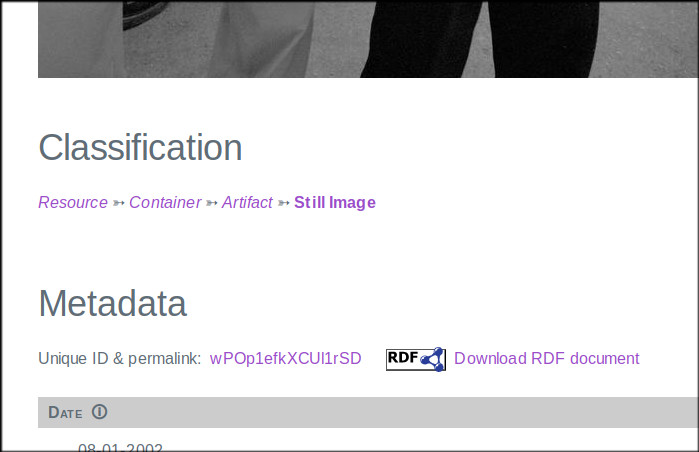
This hierarchy is visible in the presentation page illustrated above, which shows a resource of "still image" type. The page has a "Classification" section with a chain of links, such as: "Resource ➳ Container ➳ Artifact ➳ Still Image". This means that the resource being viewed has a "Still Image" primary type (the most specific type), which is a specialization of "Artifact", which is in its turn a specialization of "Container", which derives from the top-level "Resource" type. Searching for all Still Images will find this resource. Also searching for Containers, or for Resources, will find this resource.
Each content type inherits common properties from a broader type and may add more properties specific only to that type. For example, we define a Postcard type as a sub-type of Artifact. This type has some properties such as author, location, date, etc., some defined directly in the Artifact schema, some others inherited by its ancestors. Postcard also has a "Has file" relationship that allows the work to be related to any files. The Postcard type will inherit all these properties automatically and there is no need to redefine them.
We can add more properties to the Postcard type, e.g. an "Inscription" property that contains text inscribed on the object. We can also add "Has recto" and "Has verso" relationships with its members representing the two faces of the postcard. Finally, we can re-define the "Has file" property to restrict the relationship to a sub-type of "File", e.g. "Still Image File". All these properties are only available to the Postcard type and its sub-types (if any are defined).
If we later decide that all artifacts need a new property, e.g. "Description", we can add that to the Artifact type, and the Postcard type and all other sub- types of Work will automatically inherit it.
This method allows to create both simple and complex hierarchies of content types, and keep them manageable.
Core types
Pocket Archive supports the customization of the content model for each of its running instances. Some types that make up the foundations of the Pocket Archive content model, are already provided and unchangeable. Pocket Archive relies on these types, called core types, and their schemata for some of its basic functionality.
The fundamental type is resource. As the name suggests, all
resources in the system ultimately belong to this type.
resource sets some basic properties that cannot be redefined, such as id or
source_path, and others that are added for convenience and may be redefined
in sub-types.
resource has three immediate child types: container, file, and
collection. These types may be used as primary types for resources, but more
likely, their sub-types may be used.
Container is a generic type that can be used for a number of things. Its main characteristic is that it can have members. Most content model designers may want to derive more specific types from this one, for example, physical artifacts, intellectual works, parts of an object, etc. Note that a container does not have exclusive ownership over its members: a resource can be a member of any number of containers, and deleting a container only removes the relationship between it and its members, but the members are not removed (except in some situations in which the user may ask to remove a container with all of its members).
File is a digital capture or document. The file itself, as deposited in a submission, is treated by Pocket Archive as opaque data. Pocket Archive creates an accompanying metadata resource, which is automatically generated from the metadata that the archivist enters in the laundry list and other metadata automatically extracted by the system on deposit. The user-provided metadata should be exclusively about the file itself (e.g., time of creation, file size, file type, etc), as well as how the file relates to a related artifact or other resource (e.g., detail shot, documentation, transcript, 3/4 view, etc), or other files. Some of these metadata are generated automatically by analyzing the file during the submission process.
Collection is a sub-type of Container, and as such, it inherits all of its properties and may have members. But Pocket Archive also treats it specially, both in the submission process and in the presentation generation. This type can be useful for building larger bodies of works and group them thematically, by project, or any other way one may like. As collections are sub-types of containers, they have the same membership rules, i.e., a resource can be a member of any number of collections.
User-defined types and metadata standards
Most Pocket Archive installations would require the creation of some content types fitted to the archive's contents. This is most times a one-time effort that may undergo further refinements as the archive grows in complexity.
The core types are intentionally broad and they do not adopt any metadata
standard, in fact most of the defined URIs use a specific Pocket Archive
(pas:) namespace. This is in order to leave content model designers the
freedom to adopt whichever standard they prefer.
That said, the example config directory provides some simple additional types that may be helpful for archives with simple needs to get started.
For more information on setting up a content model, see the content model setup page.
Assigning content types
Each resource is assigned one and only one content type. This is done by
setting the content_type property to one of the available type codenames.
Resources are submitted to the archive, and as part of that process they are assigned a content type, after the content model has been set up. Content managers may not have much freedom to change the content model, which in any case is best when it doesn't change often.
If one-off items are acquired, it is mostly fine to classify as the most fitting type at hand. For example, if a Book and a Manuscript types are defined that inherit from Artifact -> Text, and one has a flyer to catalog, one can assign Text as the type because a flyer does not fit within either of the more specific types. This should be done in exceptional cases: assigning a very broad type to a resource results in loss of information and specificity, and if done habitually, it makes for a poorly usable archive.
While content types can be added, removed, and updated at any time, some times this implies updating all the resources that belong to those types, which can be laborious. The initial type hierarchy should be carefully evaluated before starting to populate the archive in order to minimize such labor.
Properties
Properties are bits of data attached to an individual resource. They can be descriptive, such as "label", "description", "author"; structural, such as "has member"; technical, such as "file size", "MIME type", "checksum"; etc.
The content model defines which properties can be assigned to which content type. It can also define how many values a property can have, which data type it should be (string, number, date, relationship, etc.), and other aspects. Not all of these details are always defined for all properties; in fact, many properties are usually not too strictly defined. This is a primarily curatorial decision that should be made while setting up the system, and further refined based on user feedback over time.
Setting properties
Only properties that are defined in the resource schema can be added to a resource. A command-line tool is provided by Pocket Archive for system administrators to write out the complete schema of a given instance of Pocket Archive to a document, that can be used as a reference.
The only system-mandated properties for all resources are content_type and,
for files, source_path. content_type determines the schema to be
applied to the resources, and the rules applicable to all other properties.
Property names and codes
Properties have a few names and identifiers:
- A codename, which is normally made of lowercase letters, numbers, and
underscores, e.g.,
file_size. This is an identifier used by archivists in the laundry list header. It must be unique for each property. - A human readable description, which is what shows in the presentation when resource properties are listed. This should be a concise label starting with a capital letter, e.g., "File size".
- A URI, which is mostly hidden from archivists and end users, but is a fundamental Linked Data building block ensuring that the property is globally unique. Most users need not be concerned with the URI for ordinary operations.
Property constraints
Properties can be wide open, i.e. they accept any (or no) values, or they can
be more or less strictly constrained. The advantage of constraining properties
is that increases relevance and accuracy of search results: for example, by
defining image_height as a number rather than a generic string, it is
possible to find all images with a height of less than 1000 pixels. Also,
constraining the allowed values to a controlled
vocabulary may prevent confusion. For
example, if the is_published property is meant to be a true/false value, by
constraining the range of values to true and false we can avoid having
yes, Yes, YES, y, Y, 1, t, TRUE, published, etc., entered
instead of the intended value (YES, it does happen).
On the other hand, a too strictly constrained property can make cataloging and archiving difficult, especially if a one-off case comes up that doesn't fit some imposed constraints. Which properties get constrained and how is a curatorial decision.
Below are brief descriptions of the different types of constraints supported by Pocket Archive. This information is mainly useful to archivists. When a submission undergoes validation, errors may show that require adjusting the metadata according to the defined constraints. Understanding the constraints may help fixing the errors. Details on how to define these constraints are in the Content model setup page.
Type
This constraint defines what kind of data may be entered for a property. It can be a string (any Unicode text is fine); a number; a date or date and time; a relationship; or a URL. More types may be added at later stages of Pocket Archive development.
The URL type is regarded as a string for constraint purposes, but it is treated especially in the presentation, where it will show as a hyperlink. The archivist is responsible for ensuring that the hyperlink points to a valid location. A good archival practice is to point to a Wayback Machine URL if available, which allows the archivist to display the page "frozen" at the time of the submission, before it might be altered or taken down altogether.
The relationship type also results in a hyperlink, but it is used only for
resources managed by the archive. In a laundry list, a resource ID is used, or
lacking that, the source_path of the related resource (which will be replaced
by the submission process with a generated ID). Once validated and archived,
Pocket Archive guarantees that the relationship remains sound. System-defined
properties such as has_member, has_preferred_representation, etc. are
resource type properties.
Cardinality
Cardinality is the number of values that a property can have on any resource. Minimum and maximum cardinality can be defined to cover a wide range of scenarios: a minimum cardinality of 1, for example, means that at least one value must be provided, which means, that property is mandatory. A maximum cardinality of 1 means that the property is single-valued; etc.
Range
[WIP note: not yet implemented]
The range of a property depends on its data type: for a number or a date, it can be a minimum and/or maximum value range; for a string, a specific pattern can be defined; for a resource type, the content type(s) of the resources pointed to can be restricted.
Validation
Validation is an automatic action performed by the submission process that verifies that all the input data of the SIP are conforming to their schema. If validation passes, the submission process continues as expected; if it fails, the whole submission fails and the process stops. In both cases, a report is generated, so that in case of failure, the depositor can inspect the validation results and adjust the metadata before re-submitting the SIP.
Some submissions can complete with a "warnings" outcome, which means that the submission was completed and entered, but some potential problems were spotted. These are indicated in the report.