Running Pocket Archive on a tiny budget
Pocket Archive is designed for being run and used with the least amount of resources possible. As such, it is currently being tested on a number of scenarios that emulate a low-resource environment. For example, a single-board computer (SBC):
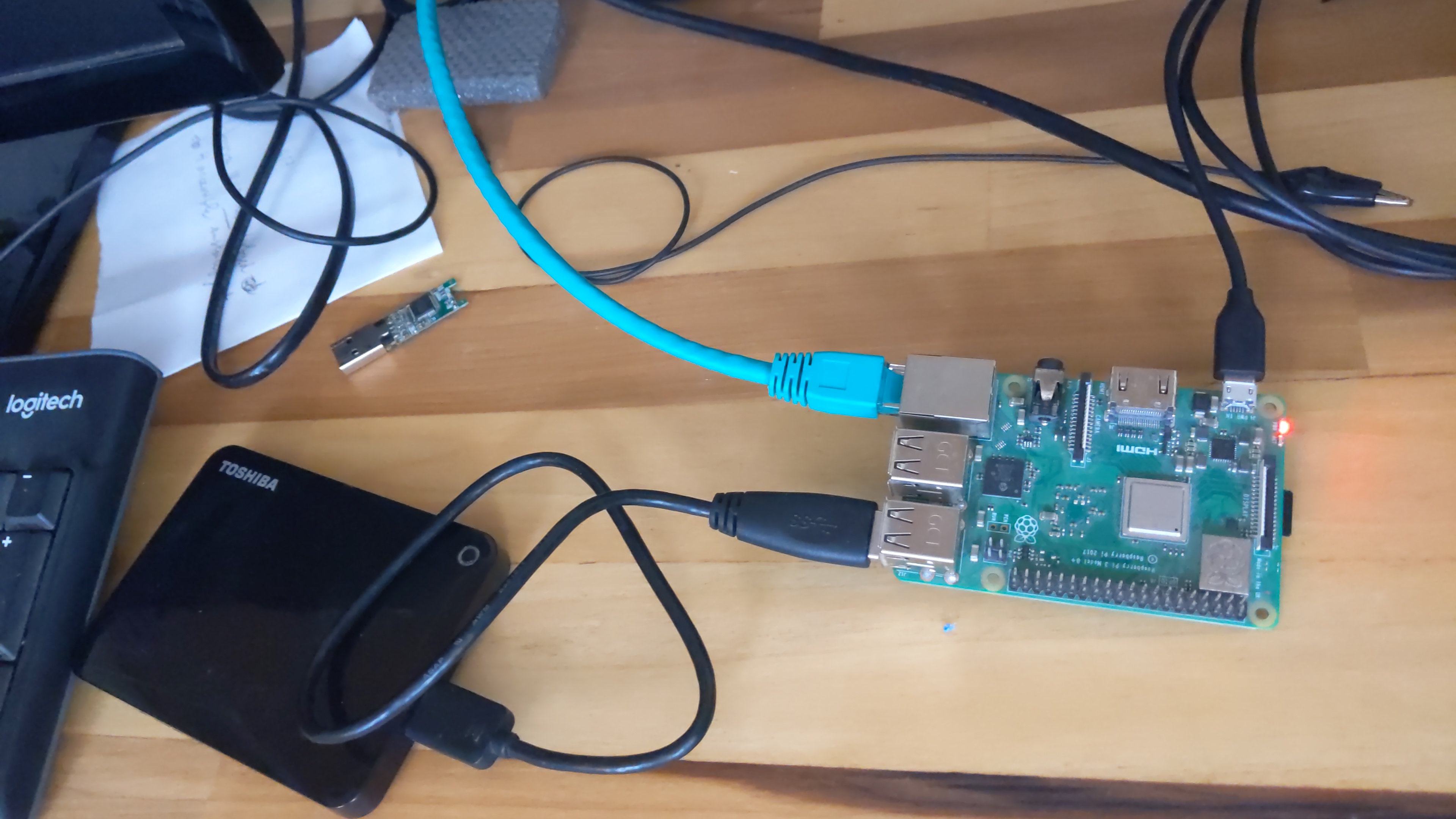
Also an ancient laptop or workstation that's unusable for even browsing the Internet or writing e-mails can still run Linux, and Pocket Archive on top of that.
Reasons for running a tiny collection
In difficult scenarios, where connectivity and access to technology is limited and transporting unique artifacts and documents is dangerous, it is convenient to run a mini-hub locally in someone's home or local community center. Lacking better digitization tools, even a cell phone or a consumer digital camera can be used to take pictures of the artifacts to be preserved, and metadata can be entered using the aforementioned ancient computer before submitting the SIP to Pocket Archive, which also runs locally. This ensures proper archiving of materials.
Institutions running a larger hub, not necessarily on Pocket Archive, can periodically harvest data from these local collections; or, in cases where connectivity is a challenge, the local Pocket Archive instances can proactively push contents to the hub(s) when they are able to reach them. This part is out of the scope of Pocket Archive, but attainable with help from an IT specialist.
This strategy aids in the urgent task of safeguarding materials at immediate risk, and builds up resilience by means of replication. If the individual home or community center is attacked and the local collection destroyed, the larger hub holds a copy. If the larger institution is jeopardized (physically, organizationally, or from a hacker attack), the local collections remain. A third copy may (and should) be kept offshore by the larger hub in cases of a disastrous scenario.
Required hardware & costs
This section is meant to be used as a guideline for minimal system requirements for tiny and small archives. It will be updated (along with the definitions of "tiny" and "small") as testing progresses.
- Single-board computer with at least an ARMv8 processor and 1Gb RAM. ARMv7 is not currently supported by some upstream dependencies. The picture above is of a RPi 3 model B+, but there are even more powerful and compact boards within the same price range (but less easy to set up), such as the BananaPi.
- Flash drive chip (Micro SD) to run the operating system and software. A 64Gb card may have the space for all of that plus a tiny archive. Get a good quality brand one.
- External hard drive. A 3.5" portable enclosure with 1Tb capacity would provide enough space for a small archive, or a back up for a tiny archive stored on the SSD.
A breakdown of the costs (prices are indicative, taken from the 2026 US marketplace):
- Raspberry Pi 3 model B+: $40
- 64Gb Micro SD flash drive: $30
- 1Tb external HDD: $70
- Power supply: $12
For a grand total of 150-160 dollars you can have Pocket Archive running a small private archive.
Notes
The goal of this benchmark is to be able to test the system with 1000 or more average-sized files.
An external hard drive is strongly recommended even if the archive fits within the SSD. See notes on preservation storage regarding flash drives. In a normal situation, even the external portable HDD would not be adequate for long-term preservation, but in an emergency situation it can provide a stopgap measure until a reliable backup system is set up.
When running an external hard drive powered via the USB cable (such as the one in the picture above), ensure that the computer's power supply is enough for both the computer and the hard drive. If using a larger enclosure with a 5" HDD and dedicated power supply, that restriction does not apply. The latter is probably more reliable, but less easily transported in case one has to pack up quickly.
Benchmark
Using a script to synthesize documents, a 1024-page book was generated. Each page of the book consists of a 2048x3072-pixel image (uncompressed PNG, 13Mb each) and a 2048-character plain-text "transcript" file, plus a descriptive resource for the page itself. A structure tree for the whole book was also generated. This could represent a realistic use case of a small collection.
The deposit was done via command line, with the pkar_watch service turned off
to conserve memory.
- Deposit time (excluding file transfer time to the Pocket Archive server): 68m 3s
- Site generation time: 50m
- Total volume: 3287 resources (including some preexisting resources)
- DB size: 23Mb
- Data directory size: 14Gb
- Timings:
- Listing all resources (
pkar list): 600÷4000s (median: 700ms) - Dump book resource metadata with 1024 members (
pkar dump-res): 550÷1200ms - Dump single image metadata (
pkar dump-res): 520÷1100ms
- Listing all resources (
- Web UI responsiveness: within normal range, even on the main book page with a 2048-element tree
These results are encouraging. Work has been slated for later releases to improve overall deposit and site generation timings, from which even a small processor like the RPi's should benefit.