Submission guide
Technical terms are linked to their glossary definitions.
Archival process overview
Pocket Archive receives new contents, and updates to existing contents, via submissions. A submission is an individual contribution to the archive that can add, update, or delete resources. A submission may include multiple resources, which can be related but do not necessarily have to. New additions and updates can be combined in one submission, deletions are performed separately.
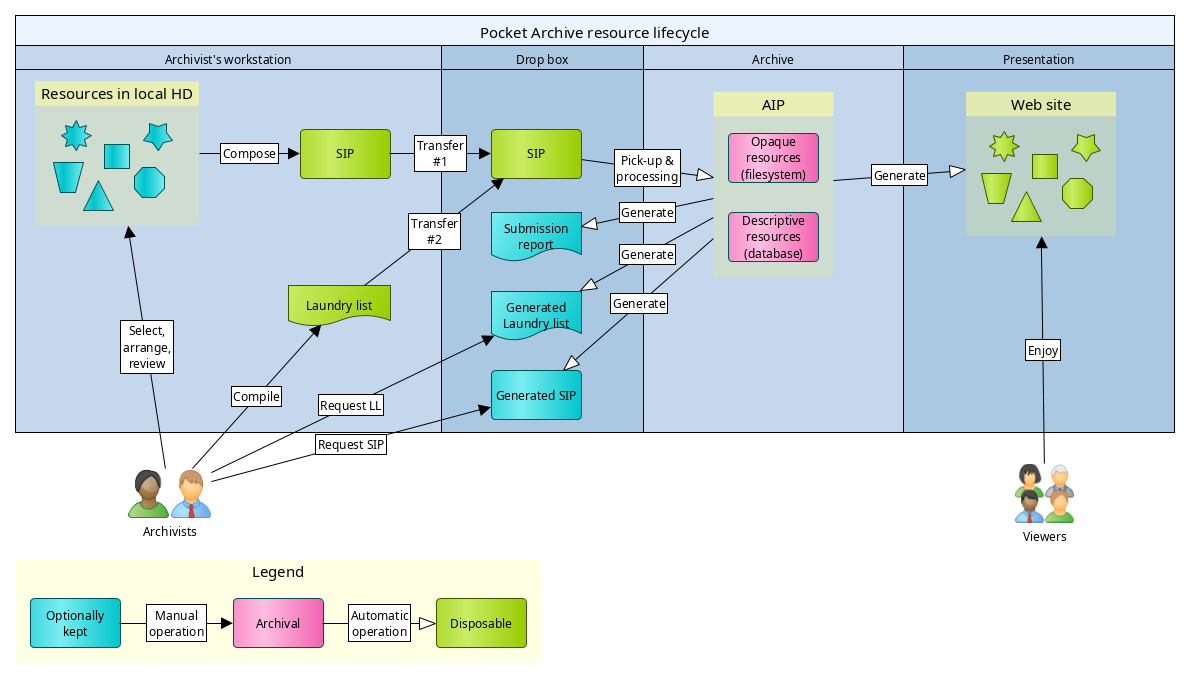
The above chart illustrates the typical life cycle of Pocket Archive resources:
- Depositor selects and lays out digital resources to be archived in his or her own workstation.
- Depositor creates a laundry list that includes an inventory of the resources and their metadata. This, together with the files and folders previously prepares, constitutes the SIP.
- Depositor transfers the SIP to the Drop box: first the files and folders, then, separately, the laundry list.
- Upon receipt of the laundry list, Pocket Archive processes the incoming materials and archives them.
- Pocket Archive generates a report after the process is complete (regardless of whether it was successful or failed).
- Depending on setup, Pocket Archive may delete the SIP from the Drop box if the submission succeeded.
- Depending on setup, Pocket Archive may (re-)generate the presentation.
- If the depositor wants to update the archived resources, they can either request a full copy of the SIP, (or to only update metadata, only the laundry list), edit it and/or replace files, and re-submit the new SIP; or edit individual resources via the admin interface.
- The depositor can remove a resource and, optionally, all its members at any time.
Processing of the SIP (point 4 above) either succeeds or fails as a whole. This means that a submission will never perform only a part of the task that it is meant to complete. This is called an atomic operation and it is designed to ensure consistency of the data.
Individual steps are described in detail in the following chapters.
Submission Information Package structure
A submission is performed by preparing a Submission Information Package, or SIP, which consists of data, i.e. files optionally arranged in a curator-defined folder hierarchy, and metadata, the latter gathered in a single file called a laundry list; and sending them both to Pocket Archive for processing.
A folder containing SIP examples is available as a quick reference and for testing. Other examples are illustrated further down in this document.
As the above life cycle chart shows, the SIP is a disposable asset. Once it is successfully archived, it can be deleted. The full SIP can be regenerated by the archive and retrieved at a later time.
The original files in the depositor's workstation can be optionally kept and/or copied to local storage. This is strongly recommended, at least until Pocket Archive reaches a stable status and can be exclusively relied on for long-term preservation. More copies means more chances to recover data from corruption or loss, but it also means higher storage costs.
Source file & directory layout
Preparation of the SIP begins with selecting the materials to submit. Generally, it is good practice to select a group of curatorial items more or less related to one another, e.g. a small coherent collection of descriptive resources and files, or a day's work within a large collection that may take long to complete. It is not critical to get this part perfectly right, as more can be added to the archive at a later time. It is more important to keep submissions not too large, as a single malformed element can cause the whole submission to fail, and not too small, to avoid too many iterations that can become burdensome. Submissions of tens to hundreds of files are in a quite safe range.
The arrangement of files and folders is important, the ordering of sources in a folder is less so. By understanding how Pocket Archive interprets the source layout, one can use it to automate some work.
A file or sub-folder inside a parent folder creates a membership relationship between the two, so that, e.g. one can create the following layout:
my_collection
  |
  `- work1
  |   |
  |   `- file01.tiff
  |   |
  |   `- file02.pdf
  |
  `- work2
      |
      `- file3.mpg
This creates a collection, my_collection, with two members, work1 and
work2, the former containing file1.tiff and file2.pdf, and the latter
containing file3.mpg.
Ordering of the files or folder in a SIP is defined in the laundry list, as we will see further down, so using file names to force a certain order is not necessary (however it can provide a good starting point for large lists of files or folders under a parent).
Laundry list
Once the files to be included in the SIP is completed, a laundry list is compiled. This is, as the name suggests, an inventory of all the resources that go into the submission; but it provides much more information than that, by defining metadata and relationships between resources.
File format
The laundry list is a CSV file and may be edited in any
application that supports CSV reading and writing. Care must be taken when
using some applications, to ensure that the file is exported as CSV. In
LibreOffice, for example, "Save" writes the file as .odt format, which is not
usable as a laundry list. The spreadsheet must be instead exported as a .csv
format.
LibreOffice is the recommended (but not mandatory) tool for editing laundry lists, and this project may provide additional utilities specific to LibreOffice to facilitate laundry list authoring.
Examples of laundry lists are in the examples directory of the Pocket Archive code (and also installed locally with the software package).
Many spreadsheet applications allow grouping multiple tables or sheets in one file. CSV supports only one table per file. While some may find it convenient to keep multiple laundry lists in one spreadsheet file, one must take care of exporting each sheet individually as a CSV.
Layout
Rows in a laundry list CSV
Let's take a look at an example laundry list:
| content_type | id | source_path | creation_date | label |
|---|---|---|---|---|
| collection | DGhcKfacu9w35FBH | my_collection | 01-07-2026 | My first collection |
| still_image | Sg9hYIISjRjlkP62 | my_collection/work1 | 12-07-2002 | My first deposited work |
| still_image_file | 7hic19YTXA8Fudxo | my_collection/work1/file1.tiff | 09-22-2025 | |
| still_image_file | Z509TdNhpTjPYDS4 | my_collection/work1/file2.pdf | 09-23-2025 | |
| video | Sg9hYIISjRjlkP62 | my_collection/work2 | 12-07-2002 | Video work |
| video_file | lUaqTi9JdTdV9tJh | my_collection/work2/file3.mpg | 10-15-1996 |
This laundry list defines the SIP as in the example file layout in the "Source file & directory layout" section above.
Note the difference between the still_image and still_image_file, and
video and video_file content types. We will get back to it further down.
The first row of a laundry list is reserved for the header, which indicates the
field names. These can be in any order, but following a
consistent order is recommended. The order used in this document and in all
laundry lists automatically generated by Pocket Archive is: content_type,
id, source_path, and then all other fields in alphabetical order. This
means that fields from different schemata may be included
in any order in the same laundry list. All field names included must be
defined in the content model. Only the fields that are providing data need to
be included.
Each subsequent row represents a resource (except in a multi-value case, described below).
Except for the ones noted in the "Fields with a special meaning" section below, all fields are optional for the submission to be considered well-formed. However, some schema may have constraints on some fields, depending on the content model configuration. A submission will still fail if it is well-formed but does not respond to some mandatory schema constraints.
Note that the laundry list does not necessarily have to define every file or
directory in the SIP. A file or folder that is not included in the laundry list
will not be included in the submission. For example, even if the collection
directory were omitted, the SIP would still be accepted (as a result, the works
would be deposited without a collection).
Entries with a directory as a source path, or without a source path defined, create descriptive resources. These directories may or may not exist in the SIP. Thus, this is a valid laundry list:
| content_type | id | source_path | creation_date | label |
|---|---|---|---|---|
| collection | KCFNxyGVYEtnEqGD | non/existing/path | 01-07-2026 | My first collection |
After archiving, if the SIP is rebuilt from the archive, the
non/existing/path folder will be created.
This is likewise valid:
| content_type | id | creation_date | label |
|---|---|---|---|
| collection | hptZJXDLc13xAcNJ | 01-07-2026 | My first collection |
So is this one:
| content_type | creation_date | label |
|---|---|---|
| collection | 01-07-2026 | My first collection |
Fields with a special meaning
Some fields in a laundry list have a special meaning for Pocket Archive, and must respond to some system-defined criteria.
content_type
Mandatory on creation, single-valued.
It defines the content type assigned to the resource. For files, it must be
file or a sub-type thereof, except for inferred resources (see below). For
directories it must not be a file or sub-type. Consult the content model of
your archive for a list of defined type names.
For resources being updated, this may be left empty (the safest option) or it must be the same as the original resource. The content type of a resource cannot be changed once set.
id
Mandatory for resources being updated, single-valued.
For new resources it becomes the primary identifier, which is used anywhere information about the resource is retrieved.
If left blank on new resources, the system generates an identifier. By default, this is a 16-character random string containing uppercase and lowercase letters and digits, which can reasonably guarantee uniqueness within an archive size that Pocket Archive is meant to manage. However, re-submitting the laundry list a second time with the same blank fields will create duplicate resources, because new IDs will be generated for the new submission; therefore, it is recommended to always fill this field in, or to consider a laundry list without IDs as one-use only, and instead get a new laundry list generated by Pocket Archive for the stored SIP, which will have the IDs filled in, if an update is needed.
Depositors providing their own IDs are responsible for ensuring that these are unique across the system.
source_path
Mandatory for new files, single-valued.
It refers to the file or folder path relative to the package, using forward
slash / characters to separate folders and subfolders or files. It can be
omitted for files being updated, and for folders (descriptive
resources). If it is present on a file
update and the file exists in the SIP, the file is used to replace the archived
file. If it is present and different from the archived file's path, and it does
not correspond to a file in the SIP, Pocket Archive will only update the file
path in the archived file metadata. This path is used when rebuilding the SIP
from the archive.
has_member
Optional, multi-valued.
This property establishes a relationship between two resources, that the system
handles in a particular way. Any resource that is a sub-type of container may
have members.
has_member is used to build trees (see details in
Trees section) and collections, and to create listings of
thumbnails in the presentation.
has_member also has a special meaning when deleting resources. If the
--members option is provided to the pkar remove command, resources linked
via the has_member property to the resource being deleted are also deleted,
along with their own members, recursively. See the "Deleting resources" section
below.
Members can be created implicitly or explicitly. The most straightforward
method is explicit, by setting the has_member property on the container,
indicating the UID of the member. If the member is in the same laundry list and
has a source path, the source path can be provided instead of the UID. If,
instead, the member is an already archived resource, only its UID may be
provided (source paths are unique within the laundry list, not within the
archive).
The implicit method is used when a parent directory contains other directories or files. The latter automatically become members of the former. This is a very handy method to establish many relationships in larger submissions without the tedious work of pasting a lot of UIDs all over the spreadsheet.
Only directories and files directly under a container become its members; but members can be arbitrarily nested, so if one has the following entries in a laundry list:
collectioncollection/acollection/a/b.tif
Then:
collection/abecomes a member ofcollection;collection/a/b.tifbecomes a member ofcollection/a.
Note that if collection/a is not entered in the laundry list,
collection/a/b.tif does not become a member of collection, because it is
not a direct child.
Multi-valued fields
A laundry list supports entering multiple values for any of the fields, except
for content_type, id, and source_path. To provide multiple values for one
or more fields, additional values are added to rows below the previous. For
these additional rows, the fields content_type, id, and source_path
must not be filled.
Note that a content model, including the core one that is integral to all Pocket Archives instances, may impose restrictions on some fields, which may not allow more than one value.
Example of a table with a single resource with multi-valued fields:
| content_type | id | source_path | alt_label | description | label |
|---|---|---|---|---|---|
| still_image | Sg9hYIISjRjlkP62 | my_collection/work1 | An alternative label | A description of the work goes here. | This is the title and must have only one value. |
| You can have as many as you like of these | Another description goes here. | ||||
| FREE alt labels! (as long as supplies last) |
The submission process checks if the content_type (for new resources) or id
(for updates) field is filled in a cell to determine whether a row in the table
is a continuation from the previous one, adding multiple values. Having a row
without content_type or id, and with source_path, is considered an error.
Depositors can leave as many blank rows as they like if that helps them visually separate resources with multiple values. Blank rows are ignored by the submission process.
Indicating relationships
Relationships can be established between resources.
These are stored as persistent links and appear as hyperlinks in the
presentation and in the admin interface. A
relationship can only be set for a field that is configured as resource type.
Consult your content model configuration to find which properties are
relationships.
has_member is only one possible type of relationship, which is defined by
default and handled in some special ways by the system. Content model
designers can define their own relationships.
To set a relationship with a resource in the same laundry list that doesn't have an explicit ID set, insert the source path of the resource. For a resource that has already an ID, either because it is in the same laundry list and has been assigned one manually, or because it is already archived, insert the ID string.
Example table with implicit and explicit relationships, some path-based and some ID-based:
| content_type | id | source_path | has_member | label |
|---|---|---|---|---|
| collection | p9tXQGBb9iC7xEqm | my_collection-1 | This collection has implicit members from the folder hierarchy. | |
| still_image | KHwYidw4R7xUAEMN | my_collection-2/image001 | Resource with an explicit ID. The ID can be used in a reference. | |
| text | my_collection-2/text0001 | Resource without explicit ID. It can only be referenced by source_path. | ||
| collection | EUXRg9igmU9ouzVH | my_collection-2 | p9tXQGBb9iC7xEqm | This collection has explicit member relationships. |
| my_collection-2/text0001 |
When the laundry list is processed for submission, the path-based references are replaced with IDs, which are automatically generated where not provided. Therefore, a laundry list generated from archived resources may look different from the original one. The generated laundry list should be used for re-submission.
Tree structures
All property values in Pocket Archive are unordered. This means that values in a multi-valued field may be stored or displayed in a different order than they were entered.
When generating a presentation, Pocket Archive orders all values of each property alphanumerically. Most times, this is sufficient as it provides a predictable and consistent order to multiple values.
However, a specific order is often required for some fields, especially for members of a container. Furthermore, a container may need to represent a more complex structure that contains multiple levels of containment - for example, a book with volumes, sections, chapters and pages, some of which may be purely logical (sections and chapters), some others may represent physical elements (volumes, pages). For these use cases, the laundry list format offers some features that allow establishing a user-defined order that is stored in the archive, called a tree.
A tree is generated for each resource that it is explicitly requested for. To
request a tree generation for a resource, that has the has_tree property set
to true (or any other value than false or an empty cell). If that property
is set, that resource becomes the root of a tree. Pocket Archive looks at
the source paths of the resources in the laundry list and at their ordering in
the CSV rows to determine the tree structure.
A tree is effectively a shadow structure that lives in a special area of the archive, and is not directly accessible by the user. Tree elements reference actual resources in the archive, and no structural metadata are stored directly in the resource itself (except for a reference to the tree). This makes it possible to have the same resource in multiple trees, and to modify or completely delete a tree without affecting the referenced resources.
The ordering of rows in a laundry list determines the ordering of the resources in their tree. The system automatically assigns an order to the resources, using their source path and their position in the laundry list.
Ordering is also maintained for resources explicitly designated as members; e.g., in the following table:
| content_type | id | has_member | has_tree | label |
|---|---|---|---|---|
| container | NfTqMJeDqQHbhzWO | 100101 | TRUE | Container with explicit members |
| 100102 | ||||
| 100501 | ||||
| 100103 |
Note the has_tree property set on the container. Without it, its members
would not have a predefined order and would be displayed in the presentation
in alphanumerical order: 100101, 100102, 100103, 100501 instead of the
order indicated in the laundry list.
Apart from ordering, tree structures can be used to express parent-child relationships. The position of a child (in this case, called a branch) resource is determined by its source path relative to the tree root.
A tree can have only one root. Therefore, if collection/work1 and
collection/work2 are present in a laundry list, and collection/work1 has
has_tree set to true, collection/work2 is not included in the tree. If
collection/work1/part1 is present anywhere in the same laundry list, or even
collection/work1/deep/nested/child/in/tree, those are added to the tree. This
is an important difference from membership, which only considers direct
children for inclusion.
If a path such as collection/my_book/volume1/chapter3/page125 is found in a
laundry list alongside with collection/my_book that is a tree root, and no
other paths between the two are mentioned in the laundry list, Pocket Archive
creates a branch for each intermediary path element. The intermediaries are
purely structural metadata and don't serve any other purpose than being
placeholders for the structure, which may provide some useful information for
the users without any additional descriptive metadata. These branches, as other
structural metadata, are not accessible by the user but they will display in
the presentation to help shaping the tree structure.
Collection trees
Trees generated for collections are handled in a special way. Because collections tend to be large by nature, and because when a resource is updated its whole tree is rebuilt, a collection tree has only one level: it is effectively a flat, ordered list.
Containers inside the collection may have arbitrarily complex trees; however, these need not be updated if the collection is re-submitted for an update.
A tree must still be requested explicitly for a collection, as for any other
resource, by setting the has_tree value. If a tree is not requested, the
collection will still have its direct children as members, which in the
presentation will show in an alphanumeric order (by label).
Dumping machine-readable tree information
While trees are not modifiable by users, they may be used by other applications
or by system maintainers for analysis and debugging. Tree information can be
retrieved for a resource with the CLI command pkar dump-tree <resource ID>.
The result is a simplified version of the tree structure, serialized as JSON.
It is simplified in that the structure shows the curatorial resources
referenced by the tree branches, and only shows the bare branches if they have
no reference. This is probably the most useful and concise representation, but
as Pocket Archive gets used more and more in the real world, this assumption
may change.
Resource types and sub-types
This section is a very concise introduction to content modeling in Pocket Archive, which is treated in detail in the Content modeling guidelines. It is strongly recommended to read that guide before archiving resources in earnest.
The three main resource types found in a submission are: Container, File, and Collection (which is a sub-type of Container). See the Content modeling guidelines for more information about these.
These three key content types are seldom used as-is. They usually have sub-types, which are defined in the content model. See the content modeling guide for more information about sub-types.
Types provided by Pocket Archive may have similar names but different uses. For
example, the still_image type, a sub-type of artifact, designates a visual
object, e.g. a photograph. still_image_file may be the capture (e.g. scan) of
that object, but also the capture of a text work if it is the scan of a
book page.
See the example SIP directory for examples of artifacts, files, and containers making up a two-sided postcard.
Submission ID and submission name
Each submission gets a randomly generated ID when it starts. This ID is attached to all the resources in the submission. This makes it easier to find out later on when and how a certain resource was submitted. It also makes it possible to generate a laundry list that contains all the resources of the original submission.
The ID is automatically generated and system-controlled. It cannot be changed.
A submission can also have a name, which is optional and user-defined. The
submission name is determined by the file name used for the laundry list. E.g.
pkar_submission-my_new_collection.csv will use my_new_collection, i.e. the
text between pkar_submission- and .csv, as the submission name. Submission
names are not required to be unique. Of course, the laundry list file names
must be unique in the drop box they are deposited to.
Updating resources
A submission is also used to update existing resources. Each resource update is a full replacement of all the resource's metadata, so a submission must include a full representation of each of the resources updated.
Any single submission can contain a mix of new and updated resources. If the correct fields are provided (see "Fields with special meaning" above), Pocket Archive will know which is which.
To facilitate this task while avoiding the need to hold on to all of the archive's laundry lists, Pocket Archive can generate a laundry list for one or more selected resources. This list, which represents the current state of the resources requested, can be edited and re-submitted for an update. Read the Admin interface document for further information.
The administrative interface, if enabled, has also a facility to inspect and update an individual resource, because performing such one-off tasks using only submissions via laundry lists could become a tedious job.
The submission report
Every submission, successful or not, generates a report. This is returned in
the output of the shell command pkar deposit, or saved in the drop
box if the submission was done with that method.
The submission report is a JSON file that may look thus:
{
  "timestamp": "2026-01-24T15:00:49Z",
  "result": "success"
  "message": "The SIP has been successfully submitted.",
  "metadata": {
    "trees": {
      "0001": {
        "root": {
          "label": "postcard1",
          "id": "0001",
          "branches": […]
        },
        "id": "qlENGxnnQ5svLEHO"
      }
    },
    "sub_id": "sub:ltdfMLwoTzznQ1Yh",
    "resources": {
      "0001": "postcard1",
      "0007": "postcard1/back/back-prod.jpg",
      "0006": "postcard1/back/back-presv.tif",
      "0003": "postcard1/front/front-presv.tif",
      "0004": "postcard1/front/front-prod.jpg",
      "0005": "postcard1/back",
      "0008": "postcard1/presentation.jpg",
      "0002": "postcard1/front"
    }
  },
}
The fields can occur in a different order than displayed.
timestamp is the time stamp of when the SIP was
submitted.
result is a keyword that can be success, failure, or warnings.
warnings means that the submission completed and all resources were created,
however the process may have raised some concerns that the depositor is free to
deal with, or ignore.
message is a human-readable message about the outcome of the submission.
metadata contains some possibly useful quick references to the SIP contents:
trees shows the tree structures generated by the process;
sub_id is the unique submission ID that is assigned to all the resources in
the SIP; resources is a list of all the resources created, including the ones
implicitly created by the process. This is a map of resource IDs on the left,
and the user--provided source paths on the right. A false value for a path
means that the resource (necessarily a descriptive resource) has no path, and
no folder will be created when the SIP is regenerated from the archive.
On a bad day, one may receive this other kind of report:
{
  "timestamp": "2026-01-24T15:42:55Z",
  "result": "failure",
  "message": "An error occurred while parsing the SIP.",
  "metadata": {
    "ll": "test/assets/sip/pkar_submission-bad-dup_path.csv"
  },
  "traceback": [
    "...te/.luarocks/share/lua/5.4/pocket_archive/submission.lua:609: Duplicate source path: demo_collection",
    "stack traceback:",
    "\t[C]: in function 'error'",
    "\t...te/.luarocks/share/lua/5.4/pocket_archive/submission.lua:609: in function <...te/.luarocks/share/lua/5.4/pocket_archive/submission.lua:503>",
    "\t[C]: in function 'xpcall'",
    "\t...te/.luarocks/share/lua/5.4/pocket_archive/submission.lua:809: in method 'new'",
    "\t...cks/lib/luarocks/rocks-5.4/pocket_archive/scm-1/bin/pkar:92: in field 'fn'",
    "\t/home/ste/.luarocks/share/lua/5.4/cli.lua:59: in function </home/ste/.luarocks/share/lua/5.4/cli.lua:35>",
    "\t(...tail calls...)",
    "\t...cks/lib/luarocks/rocks-5.4/pocket_archive/scm-1/bin/pkar:394: in main chunk",
    "\t[C]: in ?"
  ]
}
In this case, the process failed and the report provides some information that
may help find the cause. The first line of the traceback field is usually the
most useful to the depositor, as the cause may often be an incorrect metadata
field or missing SIP data. In the example, a duplicate source path was found.
If the issue is not clear or if there is a suspect of misconfiguration or a software bug, the report may be sent to the system administrator or to the software maintainer.
Deleting resources
Pocket Archive acknowledges that in real life things may actually need to be removed from an archive. The cause may be a duplicate, or something that was not supposed to be archived, etc. In any case, the financially conservative alignment of Pocket Archive supports deleting resources immediately and irreversibly. Versioning and "soft" deletion, which keep prior states of resources including deleted ones, are not supported.
A resource can be deleted via the pkar remove CLI method, or by uploading a
special file to the drop box, named pkar_remove*
(asterisk means zero or more characters—note that the file name does not need
an extension). The delete file must be a list of archival IDs, in the short
URI form (par:<ID>), one per line.
If pkar_watch, the process watching the drop box, was started with the -r
option, all members of the resources are recursively deleted (this means also
members of members). This is set by the system administrator and is applied
to all deletions. It cannot be overridden for individual deletion requests.
Advanced techniques
Some hidden tricks can be employed to facilitate the creation and management of larger submissions.
Bulk ID generation
As mentioned before, explicitly adding IDs in a laundry list simplifies later editing and management. However, this is one of the most tedious parts of a laundry list creation.
Fortunately, such repetitive and error-prone tasks can be easily automated with tools provided by most spreadsheet applications. A macro (a mini-program that runs in an application) for LibreOffice Calc is provided here to automatically generate 16-character IDs for all the cells selected in a table.
Single-file containers
when submitting containers that have only one file, one can use a shortcut:
| content_type | id | source_path | label |
|---|---|---|---|
| container | RNNoF2TSamvGRFUZ | coll35627/6248320_vyyB.tiff | Container with implicit member |
This laundry list is submitting a container that has the source path of a file.
If the file actually exists in the SIP, Pocket Archive creates two resources: a
container, with the indicated ID and metadata provided in the laundry list, and
a file, as a member of the container, using the file path provided. This cuts
the rows to be entered for one-file containers in half. The content type of the
created file is defined in the schema, via the
default_fmodel attribute.